
Cake Maker Kids Cooking
More Games


What it is and what you do
Most cooking games rush you through a kitchen; this one stays focused on a single job: making a cake from start to finish.
Cake Maker Kids Cooking is a guided, step-based cooking activity aimed at younger players. The main loop is consistent: pick one of three cake styles, prepare the batter by adding ingredients in the order the game requests, bake the cake in an oven, then move to a decoration screen with icing and toppings.
The game is less about timing and more about sequencing. Each stage highlights the next tool or ingredient, and progress happens when the correct item is selected. Mixing is presented as an interactive step (usually a short action like stirring until the prompt clears), and baking is handled through an oven step that completes after a brief wait.
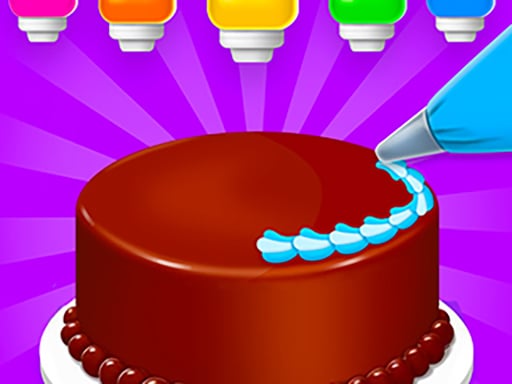
Decoration is the part with the most choice. After the cake is baked and cooled, the player selects icing and adds toppings such as candies and sugar crumbs. The game treats these as discrete selections rather than freeform placement, so the result is a finished cake design assembled from preset options.
Controls and how to play
The only input is mouse click or tap. The game is built around selecting highlighted objects, so there is no character movement and no need for keyboard controls.
A typical run follows a predictable order. First, choose a cake type from the three available. Next, the ingredient area presents items one at a time (for example, flour, eggs, and other batter components), and the correct item is usually marked or positioned to draw attention. After the ingredients are added, the game moves to mixing, then to the oven.
The oven step is a separate screen where the cake goes in and comes out after a short, fixed process. It is not a temperature-management simulator; there is no manual heat setting. After baking, the game transitions into decoration, where icing and toppings are selected to finish the cake.
- Click/tap highlighted ingredients to add them to the bowl.
- Click/tap during mixing when prompted to complete the step.
- Click/tap the oven controls when shown to bake the cake.
- Click/tap icing and topping options to decorate.
How levels and progression work
The game’s structure is closer to “recipes” than traditional levels. Each cake style acts like a short sequence of steps with a clear end state: a completed, decorated cake. A full playthrough of one cake typically takes a few minutes, with decoration taking the largest share of the time because it includes multiple choices.
Progression comes from moving through the three cake types rather than increasing difficulty through stricter scoring. The steps stay consistent (add ingredients, mix, bake, decorate), but the ingredient list and decoration options change depending on the cake selection. The game also signals progression by unlocking or presenting more topping choices as the player continues, so later cakes tend to offer a broader decoration menu than the first one.
There is no failure state in the usual sense. If the wrong item is tapped, the game generally does not punish the player; it simply waits until the correct ingredient or tool is selected. Because of that, the “difficulty” is mainly about recognizing prompts and following the correct order rather than managing limited resources or time pressure.
What catches people off guard (and one practical tip)
The most common point of confusion is that the game expects a specific sequence even during steps that look open-ended. For example, players may try to decorate immediately after baking, but the game may require a short cooling or intermediate confirmation tap before decoration options appear. If the screen seems stuck, it usually means a required item has not been tapped yet.
Another small surprise is how decoration is applied. Many players expect to drag toppings anywhere on the cake, but in this game toppings are often applied as preset layers or placements tied to a selection. If a topping does not appear where expected, try selecting it again or choose a different category (icing first, then sprinkles/candies) because some toppings only show up after a base icing is chosen.
Tip: when the game moves from mixing to baking, look for the highlighted control rather than tapping the oven repeatedly. The interaction is usually a single correct tap (open/close, put in/take out) instead of a timed mini-game, so waiting for the prompt reduces misclicks.
Who it’s for
This is best suited for younger kids or anyone looking for a low-stress, guided cooking activity. It works as a simple introduction to the idea of following recipe steps in order: gather ingredients, combine them, bake, and then decorate.
Players who want detailed cooking mechanics (measuring, temperature control, scoring, or time management) will not find that here. The main value is the clear structure and the decoration choices at the end, with three cake styles providing enough variety to replay without adding complex rules.
Read our guide: The Best Games for Kids
to leave a comment.