
Addition Bird Image Uncover
More Games


Controls and how a round works
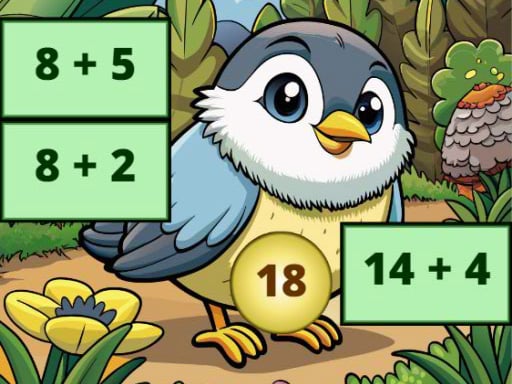
You’re basically playing with two things: expression tiles on the board and number bubbles you can drag around. Grab a bubble with the mouse (or your finger on a trackpad/touch screen), pull it onto the tile you want, and drop it to lock in the answer.
If the answer fits the addition problem, the tile clears and you immediately get a little payoff: that section of the hidden bird picture flips into view. If it doesn’t fit, the tile stays covered, so you can try a different bubble without losing your place.
The rhythm is fast. Most people fall into a loop of “scan a few tiles → spot an easy sum → drag → reveal.” And because you’re dragging answers rather than typing them, it feels more like sorting and matching than doing a worksheet.
Mouse/touch: Click/tap and drag a number bubble.
Drop: Release the bubble on the expression tile you want to solve.
Goal for the board: Clear every tile by matching the correct sums.
What you’re actually doing (and why it works)
Addition: Bird Image Uncover is an addition practice game dressed up as a picture-reveal puzzle. The board starts out as a grid of covered tiles, each tile showing a simple addition expression (like 7+5 or 9+3). Your answer choices come as number bubbles you can move around.
The objective is clean: solve every expression so the full bird image is uncovered underneath. It’s not “get a high score” or “race a timer” kind of pressure. It’s more like peeling off stickers—every correct match removes one more layer.
The best part is the feedback loop. You don’t just get a tiny green checkmark and move on. You get a visible chunk of feather pattern, an eye outline, or a wing edge appearing where the tile used to be. That visual breadcrumb trail makes you want to finish the whole board, even if you’re only here to practice addition for five minutes.
It also encourages smart choices. If you’re stuck, you can go hunt for the “obvious” ones first (doubles like 6+6, or sums that make ten like 8+2), build momentum, and let the remaining harder tiles stand out.
How it changes as you keep going
As you progress, the game leans into two kinds of difficulty: more tiles to clear and less “instant recognition” math. Early boards tend to be quick wins—usually a handful of expressions that you can solve almost on sight, so you get that first big reveal fast.
Then the board starts asking for a little more attention. You’ll notice more sums that land in the teens (like 9+8 or 7+9), which slows you down just enough that you can’t purely autopilot. That’s where the drag-and-drop format helps: you can hold a number bubble near a couple of candidate tiles while you double-check the math in your head.
A small but real difficulty spike tends to hit once most of the “make 10” pairs are gone. When the remaining tiles all look similar at a glance, it’s easy to mis-drop an answer because 13, 14, 15 start blurring together. The game doesn’t punish you hard for a wrong attempt, but it does steal your momentum, which is its own kind of pressure.
One practical tip that actually matters: clear a corner or edge area on purpose. When you uncover a clean section of the bird early, it’s easier to see your progress and stay oriented. Otherwise the reveal can feel scattered, like you’re opening random windows instead of building toward a full picture.
The satisfying part: the image reveal isn’t just decoration
Picture-reveal games can be lazy—solve something, get a random pixel, repeat. Here, the bird image reveal is the main reason the whole thing clicks. The tiles usually uncover in chunky, meaningful blocks, so you’re not waiting forever to see what you’re working toward.
That creates a fun little tension: do you chase the fastest sums to clear as many tiles as possible, or do you target the tiles that will probably reveal the most recognizable part of the picture? A lot of players end up “hunting the bird,” trying to uncover the head or wing first, even though it doesn’t technically change the math.
It’s also sneaky practice. Because you’re repeatedly matching sums to results, you start remembering common totals without grinding. After a few boards, things like 8+7 and 9+6 stop feeling like “calculate” and start feeling like “recognize.” That’s the exact skill that makes classroom addition faster.
If you’re using it for learning, it’s great in short bursts. One full board usually takes a few minutes once you get going, and it’s easy to stop after a reveal without feeling like you quit mid-level.
One surprise: it’s oddly good at showing what you don’t know yet
This game has a way of exposing the exact sums you hesitate on. Because the answers are sitting there as bubbles, you’ll catch yourself hovering between two tiles thinking, “Wait… is 7+8 fifteen or sixteen?” That moment is useful. It’s not stressful, it’s just clear.
And since you can keep trying without resetting anything, it’s low-friction practice. You can experiment, notice patterns, and correct yourself immediately. Players who already “know addition” still get value because the game pushes speed and accuracy together—especially on boards where several expressions share close totals.
For kids, it’s a solid alternative to flash cards because it feels like a puzzle with a real finish line. For adults, it’s a surprisingly satisfying warm-up if you like quick logic tasks and want something calm but not sleepy.
Just don’t be shocked if you start saying “one more board” purely to see the full bird. The math is the key, but the reveal is the hook that keeps your hands moving.
Read our guide: The Best Puzzle Games Online
to leave a comment.