
Quad Bike Racing Game

More Games

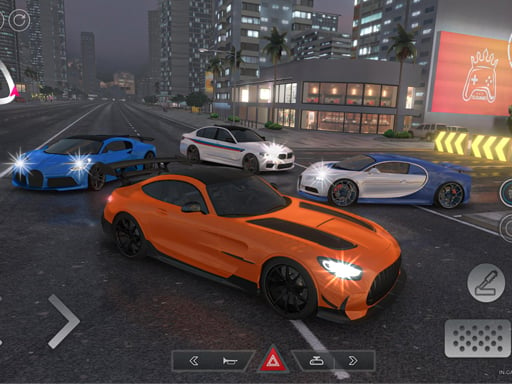


Controls and how a run actually works
You’re on the throttle immediately, and the game wants you moving fast before you’ve even settled in. Use W / Arrow Up to push forward, S / Arrow Down to back up, and A/D (or the Left/Right arrows) to steer. It’s simple, but the bike reacts like a quad: quick to turn, easy to over-correct, and it loves drifting wider than you expect if you crank the steering at speed.
Most of the extra stuff is handled through on-screen buttons. That’s where the mouse comes in—click to tap any UI action the game offers (shooting, prompts, menus, and any mode buttons). It ends up feeling like two layers at once: the keyboard is for keeping the quad alive in traffic, and the mouse is for doing “everything else” without letting your speed drop.
A good habit early on: steer with small taps instead of holding a direction. When the road is busy, holding left or right for a full second is how you clip a car’s bumper and lose your clean line. The safest path is usually a shallow weave through gaps, not a hard slalom.
- W / Up Arrow: Move forward
- S / Down Arrow: Reverse
- A / Left Arrow: Steer left
- D / Right Arrow: Steer right
- Mouse: Click on-screen buttons
So what is Quad Bike Racing Game trying to make you do?
This one’s basically “ATV racing in city traffic,” with a shooting layer sitting on top. The core loop is still racing: keep your quad moving, thread between cars, and stay stable through turns. But you’re not just chasing a finish line vibe—you’re also watching for moments where the game wants you to take shots while you’re riding.
The best moments are when it forces you to choose between a clean racing line and a good shooting window. If you drift to the outside to line up a shot, you’re also putting yourself closer to traffic that can pinch you against the edge. If you stay centered and safe, you might miss the timing and lose whatever shooting objective is being pushed at you.
It’s not a slow sim. The whole feel is “keep it moving.” On a decent run, you spend most of your time at speed, and the bike’s acceleration makes it tempting to mash forward constantly. The trick is that traffic density makes speed a problem around tighter stretches—there’s a real spike in near-misses once you’re about a minute in, when you’ve built up enough pace that small steering mistakes turn into big ones.
Progression: it ramps up faster than you think
The early stretch gives you room to breathe. Lanes look open, cars feel spaced out, and you can get away with sweeping turns. Then the game starts stacking problems: more vehicles, less time to correct, and more reasons to look away from the road because you’re clicking shooting-related buttons or prompts.
One thing you notice after a few attempts is how quickly the “easy” driving turns into constant micro-adjustments. Around the point where you’re comfortably holding top speed, you’ll get sections where two cars sit offset in adjacent lanes, leaving a narrow diagonal gap. That gap is passable, but only if you enter it straight. Come in while turning and your rear swings out, which is when you start grazing traffic and losing momentum.
The rhythm becomes: accelerate, settle the quad, pick a lane, then commit. If you keep changing your mind mid-gap, you’ll wobble into trouble. Most players who do well treat the road like a set of short decisions rather than one long race.
If the game offers multiple modes or levels, the “later” content mostly feels like it’s asking for discipline. It’s less about learning a new mechanic and more about performing the same basics while the game is actively trying to distract you. That’s where the shooting layer earns its keep: it pulls your attention right when you need it on the road.
What stands out: the shooting isn’t a side gimmick
A lot of driving games add shooting and it ends up feeling like a button you press whenever it’s safe. Here, it’s more like a second job you’re doing at the same time. Because you’re clicking on-screen buttons, you can’t just lock into keyboard-only racing mode and forget the rest. You’re constantly bouncing between “don’t hit that car” and “don’t miss that moment.”
It also changes how you drive. You start setting up safer “shooting lanes” on purpose—straight stretches where you can hold W and make tiny steering taps while your other hand handles the mouse. When you don’t have that, you feel it immediately: trying to click anything while you’re mid-turn is where mistakes happen, especially if you’re already close to another vehicle.
The funniest surprise is how often the best play is actually to ease off the steering, not the speed. Players instinctively slow down when they’re overwhelmed, but this game punishes hesitation because traffic still fills the space in front of you. Staying confident—keeping forward pressure—and just cleaning up your line is usually safer than panicking and swerving.
Quick tips that make runs cleaner
First: drive like you’re protecting your front wheel. If your front end clips anything, the quad’s line gets messy immediately, and you’ll spend the next few seconds correcting instead of pushing forward. The cleanest runs are the ones where you never touch a car at all, even lightly.
Second: use short steering inputs. Tap-left, tap-right, re-center. Holding A or D for too long is what causes the wide, floaty turn that eats up the lane next to you. If you’re trying to slip through a tight gap, enter straight, then make the smallest correction possible once you’re through.
And for the shooting side: pick your moments. If the road ahead is cluttered, treat the shooting as “nice if it happens,” not mandatory. When the road opens up, that’s when you can afford to look at the UI and click without immediately drifting into someone else’s lane.
- Stay centered in your lane until you’re sure the gap is real.
- Commit to one path through traffic—mid-change swerves cause most hits.
- Save clicks for straightaways whenever possible.
Read our guide: Top Free Racing Games
to leave a comment.