
Openworld Racing

More Games


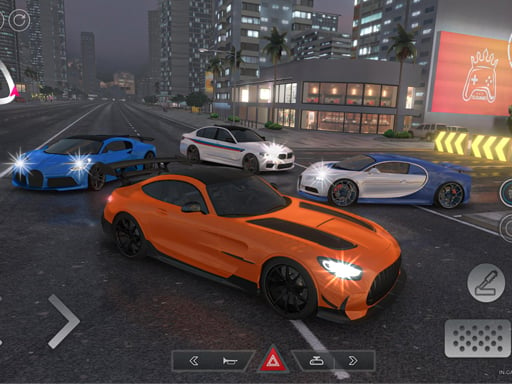


Freedom first, speed second
You’re dropped onto open streets with no countdown, no lap timer, and no one telling you where to go next. Openworld Racing is closer to a small driving toybox than a traditional racing game: pick a direction, follow the road until it turns into something else, and see what the map feels like at different speeds.
The tone is set by two simple systems that do a lot of work: a day/night cycle and quick car swapping. The lighting shift isn’t just cosmetic—night driving changes how far ahead you can comfortably read the road, so you naturally start leaning on your headlights and camera choice more than you would in broad daylight.
It’s also a game that rewards noticing little differences. The three cars don’t just look different; they push you toward different driving habits, especially when you start trying to slide corners on purpose instead of just cruising.
Controls, exactly as you’ll use them
On PC, movement starts with WASD. W handles acceleration, S slows/brakes and can help settle the car before a turn, while A and D steer. The game also shows extra controls in the top-left, which matters because camera and utility toggles are the things you’ll touch most once you’ve driven for a minute.
On mobile, the layout is more explicit: arrow icons handle your driving inputs, and separate buttons sit on-screen for the stuff you’ll want to reach quickly. The brake icon is the one you end up tapping in short bursts—more like “trim speed” than a full stop—because the cars carry momentum and it’s easy to overcook a corner if you hold the brake too long.
The three non-driving buttons are where the game’s personality shows up:
Brake icon: used for stopping, but also for controlling weight transfer before turns.
Headlight icon: toggles front lights, which starts feeling essential once the day/night cycle pushes you into darker streets.
Camera icon: changes perspective. One view tends to be better for threading through tighter streets, while another makes it easier to hold a long drift without losing your sense of direction.
One small detail: swapping cameras mid-corner can save a messy turn. If a building or roadside object blocks your view in one angle, a quick camera change usually restores your line immediately without needing to slow down as much.
Progression without levels (and what “progress” looks like here)
There aren’t stages to clear, so the progression is more about how you choose to use the space. Early on, most people spend the first 2–3 minutes just checking what kind of roads exist—wide straights, tighter street grids, and spots that invite quick direction changes. It’s a soft onboarding: the map teaches you what the cars can handle.
After that, the game’s “next step” is usually car switching. Because you can swap anytime, you start treating the three cars like tools. One becomes the comfortable default for learning the map, another feels better for quick slaloms and sharp turns, and the third often ends up as the one you take out when you want to push speed and see how long you can keep control without a reset.
The day/night cycle creates a natural rhythm too. Daytime runs are when you tend to explore—spot landmarks, learn intersections, find long stretches to open up. Night runs are when you end up repeating routes, because visibility narrows your focus. It’s common to realize you’re driving the same loop at night simply because it’s the one you trust.
So instead of “Level 1 to Level 2,” progression looks like: learn a route, learn a car, then relearn the same route at night with headlights on and a different camera angle.
Tips that actually change how it feels
If you treat Openworld Racing like a racing game, you’ll probably push too hard too early and spend a lot of time correcting. The calmer approach works better: pick one neighborhood of roads and drive it cleanly before you start trying to drift through it. Once you know where the bends tighten, you can start adding speed without feeling like you’re reacting late.
Headlights matter more than you’d think. At night, toggling them isn’t just for “seeing,” it’s for confidence—your braking points get earlier when the road ahead is dim. With headlights on, you can keep a steadier throttle through turns because you’re not guessing where the edge of the street is.
Car swapping is also a practical tool, not just a novelty. A good habit is to switch cars right after you find a new stretch of road and run it three times—once in each car. You’ll notice the handling differences fastest that way, and it teaches you which car forgives late steering inputs and which one demands earlier turns.
A few small, repeatable tricks:
Brake in short taps before a turn instead of holding it down. It keeps the car stable and reduces the “too slow, then too fast” feeling.
Use a consistent camera when learning the map, then experiment later. Switching views every 10 seconds makes it harder to build a sense of speed.
At night, slow down sooner than you think you need to. Most crashes happen because the corner radius looks gentler in the dark until you’re already committed.
If you want to practice drifting, find a medium-speed corner and repeat it. Big, sweeping drifts feel cool, but the game teaches control better on turns where you have to catch the slide quickly and straighten out without wobbling.
Common mistakes people make in the first session
The big one is assuming the point is to “beat” the map. With no checkpoints, the fun is in setting your own tiny goals—cleaning up a route, trying a different camera, or seeing how a car behaves at the edge of grip. If you only hunt for an objective that isn’t there, the world can feel emptier than it is.
Another common mistake is ignoring the camera button. People often pick a view once and never touch it again, even when they’re fighting visibility. In practice, camera modes are a comfort setting: the best one is the one that lets you read corners early and keep the horizon stable. When the car feels “twitchy,” the fix is sometimes perspective, not steering.
On mobile specifically, over-braking is the quiet killer. Because the brake icon is so easy to press, it’s tempting to slam it whenever a turn approaches. That usually makes the car feel heavy and unresponsive. Light braking earlier, then steering with a bit of patience, tends to keep the car smoother.
Finally, people forget headlights exist until they’re already frustrated at night. The game doesn’t punish you with a hard failure state, but it does quietly make you work harder for the same corner if you leave the lights off.
Who Openworld Racing fits (and who might bounce off it)
This one works best for players who like driving for the sake of driving. It’s a good fit for short sessions—five minutes of cruising, a few camera swaps, one car change—because there’s no setup and no penalty for stopping mid-run. It also suits people who enjoy learning a space gradually, the way you might in a skateboarding or walking simulator, just with more speed.
It’s also surprisingly decent as a low-pressure handling practice game. The ability to swap between three cars on the fly turns the map into a comparison tool: same corner, different vehicle, different feel. That’s the kind of small design choice that gives the game more replay value than its “simple driving” label suggests.
Players looking for structured races, opponents, tuning menus, or a career ladder might run out of things to chase. Openworld Racing is about mood and movement—daylight cruising, nighttime headlights, and the small satisfaction of taking a familiar corner a little cleaner than last time.
Read our guide: Top Free Racing Games
to leave a comment.