
Garden Decoration and Cleaning
More Games





Where it sits in puzzle/adventure (and why it feels different)
Most garden games pick a lane: either calm decorating, or task-heavy time management. This one keeps bouncing between the two, and that’s the fun of it.
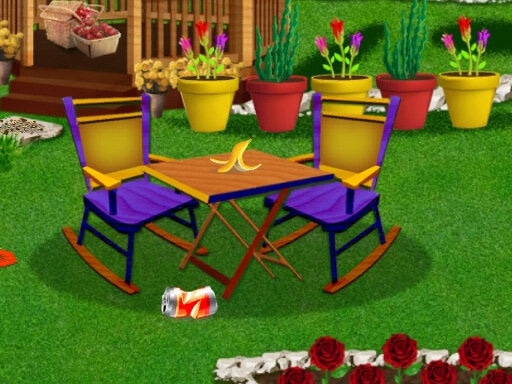
It has the “make a messy place look good” satisfaction you’d expect from a makeover puzzle, but it also gives you a tiny business loop through the flower shop. Clean the space, grow the flowers, sell the bouquets, then turn that money right back into the garden. The game rarely lets you chill for long, because there’s always one more patch to scrub, one more seed to plant, one more order to finish.
The adventure side is light, but real: you’re moving through new garden areas and unlocking new things to do, not just repeating the same board. The best comparison is a tidy-up simulator stitched to a simple crafting/order system.
What you actually do minute-to-minute
Everything is mouse-driven. You’re clicking on problem spots to clean, dragging tools when the game asks for it, and tapping plants through their little life cycle.
The main loop is simple: clear trash and grime, then start planting. Seeds go down, watering makes them grow, and harvesting gives you flowers you can turn into bouquets. Those bouquets are the “puzzle” part more than people expect—orders want specific arrangements, so you’re constantly deciding what to harvest now and what to let keep growing.
Controls stay consistent, which matters because the game asks you to do lots of small actions fast:
Click/drag to use cleaning tools on dirty patches and clutter.
Click planting spots to place seeds.
Click to water, then come back to harvest when flowers are ready.
Assemble bouquets for customer requests, then deliver to get paid.
A small gameplay thing you notice after a couple of orders: cleaning isn’t just cosmetic. It effectively “unlocks” room to work, so rushing to plant everywhere before you clear space usually backfires because you end up bouncing around the screen, losing time to tiny trips.
Progression: from satisfying cleanup to juggling orders
The early stretch is pure momentum. You’ll clean a section, plant a few basic flowers, and complete your first bouquet orders quickly. Most players get through the first set of tasks in a few minutes because the game is generous with growth speed at the start.
Then it tightens up. Around the point where you’re managing both garden restoration and a steady stream of bouquet requests, the game stops being “click everything that sparkles” and becomes “plan two steps ahead.” If you harvest every bloom the second it’s ready, you can accidentally empty your stock right before a customer asks for that exact color/flower type.
The money loop is the quiet driver of difficulty. A couple of orders will buy a decoration or small upgrade, but bigger improvements take a string of successful deliveries. That creates a natural curve: you’ll feel a little “stuck” until you get into a rhythm of rotating plants (some growing, some ready to harvest) while you keep cleaning forward.
One concrete thing: the game’s pace tends to spike when you open a new area because it dumps fresh mess to clean while you’re still trying to keep your bouquet pipeline going. If you try to do both at full speed, you’ll misclick and waste actions. If you focus—clean first for a bit, then switch to planting—you stay smoother.
A detail most players miss: cleaning order affects your whole run
It’s easy to treat cleaning like a warm-up chore, but the order you clean in changes how efficient everything else is.
Look for clusters: dirt patches near planting spots, or clutter blocking access to multiple interactable items. Clearing a “hub” area early saves you from constant back-and-forth later when you’re carrying out orders. Players who clean randomly tend to spend the midgame doing tiny detours—one patch here, one patch there—while their flowers sit ready and their customers wait.
Another easy-to-miss trick is to stagger planting. Don’t plant every seed at the same time. If all your flowers mature together, you get one big harvest moment and then a long empty stretch where you can’t fulfill new orders without waiting. Planting in two or three small waves keeps at least one set of blooms close to ready, which makes bouquet requests feel easier even when they’re asking for specific combinations.
And yes, decoration isn’t only about looks. When you reinvest money, prioritize anything that clearly expands usable space or makes your work area less cluttered. Pretty items are great, but the functional upgrades keep the whole loop moving.
Who should play it (and who might bounce off)
This is for players who like visible progress. You’re constantly turning “gross garden corner” into “actually nice,” and the game pays you off with new decoration options and more to manage.
It’s also good for anyone who likes light planning without heavy punishment. There’s no brutal fail state hanging over you, but you can definitely play smarter: clean in a smart path, stagger your planting, and keep a small buffer of flowers so surprise orders don’t stall you.
Skip it if you only want one mood. If you want pure relaxing decorating with no errands, the customer orders will feel pushy. If you want deep crafting with complex recipes, the bouquet system is simpler than that. But if you like bouncing between chores and quick “make the thing, deliver the thing” tasks, this one hits a nice, busy rhythm.
Read our guide: The Best Adventure Games in Your Browser
to leave a comment.