
Car Simulator Mcl
More Games


What it is and what you do
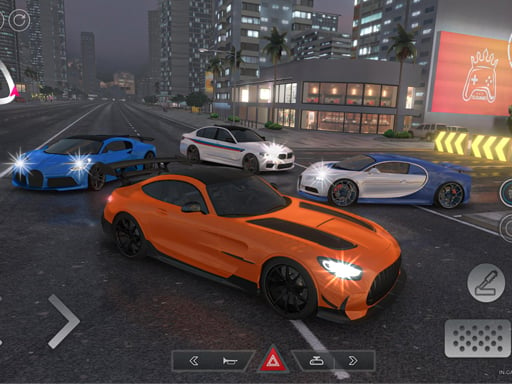
Crashing is part of the learning curve here, and the game makes sure you see it. Car Simulator McL is a 3D driving simulator built around a small selection of high-end sports cars, a drivable map, and a damage model that shows dents and deformation when you hit things.
The main activity is driving for its own sake: picking a car, getting used to how it turns and brakes, and then pushing it harder to drift corners or run faster routes. There is no story layer, no garage management, and no long campaign structure. Most sessions end up being short loops of “try a line, mess it up, reset, try again,” especially when practicing drifting.
It sits between a sandbox and a time-attack practice tool. Players usually alternate between careful laps to learn braking points and deliberately sloppy driving to see how the car behaves when traction breaks. The damage meter and visible body damage add a reason to keep runs clean if the goal is consistent speed.
Controls and how to play
The game uses keyboard controls. The core inputs are the expected driving set: accelerate, brake/reverse, and left/right steering. Most builds also include a handbrake input, which matters because the cars have enough grip that a handbrake tap is often the easiest way to start a drift on tighter corners.
A typical first run goes like this: select a vehicle, spawn into the map, and do a slow lap to see where the wide turns and narrow areas are. After that, most players start testing how early the car understeers when entering too fast. The physics have a noticeable “weight transfer” feel: if you brake late while turning, the front end bites harder but the rear can step out suddenly.
Because the damage system is active, the fastest way to learn is to separate “practice runs” from “clean runs.” In practice runs, hit the brakes late and clip a few obstacles on purpose just to learn what causes a spin. In clean runs, drive like the damage matters, because once the front end is bent up, the car tends to feel less stable at speed and correcting slides takes more steering input.
- Use steady throttle through long turns; sudden full throttle tends to break traction mid-corner.
- Tap the handbrake briefly to rotate the car, then release and catch the slide with countersteer.
- If the camera options are available, a slightly higher camera makes it easier to judge corner entry speed.
How progression works (and where it gets harder)
Car Simulator McL does not rely on a traditional level ladder. Progression is mostly player-driven: learning the map, learning the car’s turning radius, and learning how much speed the tires can hold before sliding. The “difficulty” comes from how strict you want to be with yourself about clean driving and repeatable times.
There is still a practical ramp in complexity. The first stage is basic control—keeping the car straight, stopping without overshooting, and making wide turns without scraping barriers. The second stage is cornering at speed, where most crashes happen because the car does not rotate quickly enough and pushes wide. The third stage is drifting, which asks for controlled oversteer instead of accidental spins.
A common pattern is that the game feels easy for the first few minutes, then spikes once the player tries to carry speed through corners. Many people can do a clean slow lap immediately, but once they try to link two drifts in a row, the run tends to end in a wall hit. In practice, most early “serious” runs last around 3–5 minutes before a heavy collision forces a reset or a slower pace.
If the game includes multiple models, each one effectively acts as a difficulty setting. The higher-power cars punish rough throttle more, because a small input change can break traction. Players often find they can drift the lower-power car with longer, slower slides, while the fastest model snaps into oversteer and needs quicker countersteer corrections.
What catches people off guard
The damage system changes how you should approach practice. Light contacts are not just cosmetic: repeated bumper hits often lead to a car that feels “off,” especially when braking hard or turning at speed. If a run starts to feel inconsistent, it is often because the car has already taken enough hits that the handling no longer matches what you learned at the start.
Another common surprise is how much the car understeers on corner entry if you stay on the throttle. New players often try to “turn more” and just run wider into obstacles. The more reliable fix is to set the car’s angle before the corner: brake in a straight line, ease off the throttle, turn in, then get back on power after the front end points where you want.
For drifting, the game tends to reward short, deliberate inputs more than holding buttons down. A quick handbrake tap to initiate, then immediate release, usually produces a controllable slide. Holding the handbrake too long often makes the car rotate past the point of recovery, especially at low speeds where there is not enough momentum to stabilize the drift.
- If you keep hitting the same wall, approach that corner 10–15% slower and focus on a clean exit; the speed comes back on the next straight.
- When the rear steps out, look for a single countersteer correction rather than “sawing” the steering back and forth.
- After a big crash, restart the run instead of trying to salvage it; damaged handling makes practice less consistent.
Who it’s best for
This game fits players who want a driving sandbox with consequences, not a structured racing ladder. It works well as a short-session sim: pick a car, test a few lines, and stop when you get a clean run you’re satisfied with.
It is also a decent option for learning basic drift control on a keyboard, since the feedback is immediate and the map is meant to be driven repeatedly. Players looking for formal events, long unlock chains, or detailed tuning menus may find it limited, because most of the depth comes from repeating the same spaces and improving technique.
Read our guide: Top Free Racing Games
to leave a comment.